
You have a database with tables, constraints, and relationships. You want a Go REST API that exposes it - with type-safe models, validation, pagination, filtering, and an OpenAPI spec. Without writing hundreds of lines of boilerplate by hand.
This tutorial walks through generating a complete API from your database schema using kiln, a code generator that reads your database and outputs production-ready Go code. kiln supports PostgreSQL, MySQL, and SQLite - the generated code is the same regardless of which database you use.
We'll use PostgreSQL in this walkthrough, but you can follow along with MySQL or SQLite by swapping the driver and DSN in the config. We'll show the alternatives at each step.
By the end, you'll have a running API server with full CRUD endpoints, relationship-aware nested routes, and a synced OpenAPI spec - all generated from your schema.
Table of contents
- Prerequisites
- Step 1: Initialize your project
- Step 2: Set up your database
- Step 3: Create your schema
- Step 4: Initialize kiln
- Step 5: Generate the API
- Step 6: Run the server
- Step 7: Try it out
- What the generated code looks like
- Evolving your schema
- Customization
- OpenAPI spec
- Next steps
Prerequisites
- Go 1.22+
- Docker (for running your database locally) or an existing database
- A terminal
Step 1: Initialize your project
mkdir blog-api && cd blog-api
go mod init github.com/yourname/blog-api
Install kiln:
go install github.com/fisayoafolayan/kiln/cmd/kiln@latest
Step 2: Set up your database
Start a local database instance. Pick whichever you prefer:
PostgreSQL:
docker run -d --name kiln-demo \
  -e POSTGRES_USER=demo \
  -e POSTGRES_PASSWORD=demo \
  -e POSTGRES_DB=blogdb \
  -p 5432:5432 \
  postgres:16
MySQL:
docker run -d --name kiln-demo \
  -e MYSQL_ROOT_PASSWORD=demo \
  -e MYSQL_DATABASE=blogdb \
  -e MYSQL_USER=demo \
  -e MYSQL_PASSWORD=demo \
  -p 3306:3306 \
  mysql:8
SQLite:
# No setup needed - just point kiln at a file
touch blogdb.sqlite
Step 3: Create your schema
Save this as schema.sql in your project directory. This is a blog with users, posts, tags, and a many-to-many relationship between posts and tags.
PostgreSQL:
CREATE TABLE users (
  id         UUID        PRIMARY KEY DEFAULT gen_random_uuid(),
  email      VARCHAR(255) NOT NULL UNIQUE,
  name       VARCHAR(100) NOT NULL,
  bio        TEXT,
  role       TEXT        NOT NULL DEFAULT 'member'
                         CHECK (role IN ('member', 'moderator', 'admin')),
  created_at TIMESTAMPTZ NOT NULL DEFAULT now(),
  updated_at TIMESTAMPTZ NOT NULL DEFAULT now()
);

CREATE TABLE posts (
  id           UUID        PRIMARY KEY DEFAULT gen_random_uuid(),
  user_id      UUID        NOT NULL REFERENCES users(id),
  title        VARCHAR(255) NOT NULL,
  body         TEXT        NOT NULL,
  status       TEXT        NOT NULL DEFAULT 'draft'
                           CHECK (status IN ('draft', 'published', 'archived')),
  published_at TIMESTAMPTZ,
  created_at   TIMESTAMPTZ NOT NULL DEFAULT now(),
  updated_at   TIMESTAMPTZ NOT NULL DEFAULT now(),
  deleted_at   TIMESTAMPTZ
);

CREATE TABLE tags (
  id   UUID PRIMARY KEY DEFAULT gen_random_uuid(),
  name TEXT NOT NULL UNIQUE
);

CREATE TABLE post_tags (
  post_id UUID NOT NULL REFERENCES posts(id) ON DELETE CASCADE,
  tag_id  UUID NOT NULL REFERENCES tags(id)  ON DELETE CASCADE,
  PRIMARY KEY (post_id, tag_id)
);
MySQL:
CREATE TABLE users (
  id         CHAR(36)     PRIMARY KEY DEFAULT (UUID()),
  email      VARCHAR(255) NOT NULL UNIQUE,
  name       VARCHAR(100) NOT NULL,
  bio        TEXT,
  role       ENUM('member', 'moderator', 'admin') NOT NULL DEFAULT 'member',
  created_at TIMESTAMP    NOT NULL DEFAULT CURRENT_TIMESTAMP,
  updated_at TIMESTAMP    NOT NULL DEFAULT CURRENT_TIMESTAMP ON UPDATE CURRENT_TIMESTAMP
);

CREATE TABLE posts (
  id           CHAR(36)     PRIMARY KEY DEFAULT (UUID()),
  user_id      CHAR(36)     NOT NULL,
  title        VARCHAR(255) NOT NULL,
  body         TEXT         NOT NULL,
  status       ENUM('draft', 'published', 'archived') NOT NULL DEFAULT 'draft',
  published_at TIMESTAMP    NULL,
  created_at   TIMESTAMP    NOT NULL DEFAULT CURRENT_TIMESTAMP,
  updated_at   TIMESTAMP    NOT NULL DEFAULT CURRENT_TIMESTAMP ON UPDATE CURRENT_TIMESTAMP,
  deleted_at   TIMESTAMP    NULL,
  FOREIGN KEY (user_id) REFERENCES users(id)
);

CREATE TABLE tags (
  id   CHAR(36) PRIMARY KEY DEFAULT (UUID()),
  name TEXT NOT NULL UNIQUE
);

CREATE TABLE post_tags (
  post_id CHAR(36) NOT NULL,
  tag_id  CHAR(36) NOT NULL,
  PRIMARY KEY (post_id, tag_id),
  FOREIGN KEY (post_id) REFERENCES posts(id) ON DELETE CASCADE,
  FOREIGN KEY (tag_id)  REFERENCES tags(id)  ON DELETE CASCADE
);
SQLite:
CREATE TABLE users (
  id         INTEGER PRIMARY KEY AUTOINCREMENT,
  email      TEXT    NOT NULL UNIQUE,
  name       TEXT    NOT NULL,
  bio        TEXT,
  role       TEXT    NOT NULL DEFAULT 'member' CHECK (role IN ('member', 'moderator', 'admin')),
  created_at TEXT    NOT NULL DEFAULT (datetime('now')),
  updated_at TEXT    NOT NULL DEFAULT (datetime('now'))
);

CREATE TABLE posts (
  id           INTEGER PRIMARY KEY AUTOINCREMENT,
  user_id      INTEGER NOT NULL REFERENCES users(id),
  title        TEXT    NOT NULL,
  body         TEXT    NOT NULL,
  status       TEXT    NOT NULL DEFAULT 'draft' CHECK (status IN ('draft', 'published', 'archived')),
  published_at TEXT,
  created_at   TEXT    NOT NULL DEFAULT (datetime('now')),
  updated_at   TEXT    NOT NULL DEFAULT (datetime('now')),
  deleted_at   TEXT
);

CREATE TABLE tags (
  id   INTEGER PRIMARY KEY AUTOINCREMENT,
  name TEXT NOT NULL UNIQUE
);

CREATE TABLE post_tags (
  post_id INTEGER NOT NULL REFERENCES posts(id) ON DELETE CASCADE,
  tag_id  INTEGER NOT NULL REFERENCES tags(id)  ON DELETE CASCADE,
  PRIMARY KEY (post_id, tag_id)
);
Apply the schema to your database:
# PostgreSQL
docker exec -i kiln-demo psql -U demo blogdb < schema.sql

# MySQL
docker exec -i kiln-demo mysql -u demo -pdemo blogdb < schema.sql

# SQLite
sqlite3 blogdb.sqlite < schema.sql
The syntax differs across databases, but kiln understands all three dialects and picks up on the same patterns:
VARCHAR(255)(orTEXTwith constraints) becomes amax=255validation tagCHECK (... IN (...))orENUMbecomes an enum validationNOT NULLwithout a default becomes arequiredvalidation- Nullable
deleted_attimestamp triggers soft delete behavior - DELETE setsdeleted_atinstead of removing the row - Foreign keys generate nested routes (e.g.
GET /users/{id}/posts) - Junction tables (
post_tags) generate link/unlink endpoints
Step 4: Initialize kiln
kiln init
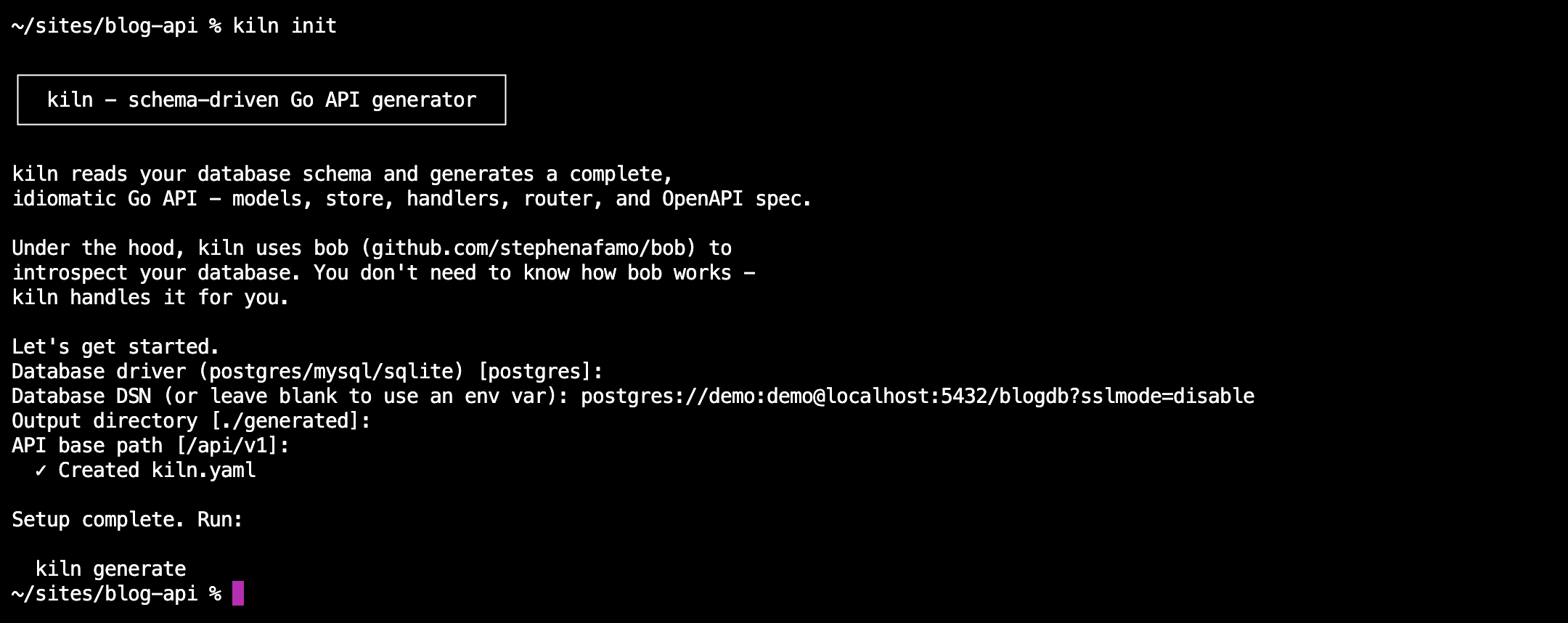
This creates a kiln.yaml config file. Update the database section based on your database:
version: 1
database:
  # PostgreSQL
  driver: postgres
  dsn: "postgres://demo:demo@localhost:5432/blogdb?sslmode=disable"

  # MySQL
  # driver: mysql
  # dsn: "demo:demo@tcp(localhost:3306)/blogdb?parseTime=true"

  # SQLite
  # driver: sqlite
  # dsn: "./blogdb.sqlite"
output:
  dir: ./generated
  package: generated
api:
  base_path: /api/v1
  framework: stdlib
Step 5: Generate the API
kiln generate
That's it. kiln reads your database schema and generates:
generated/
  models/users.go          # Request/response structs with validation
  models/posts.go
  models/tags.go
  store/users.go           # Type-safe database access via bob
  store/posts.go
  store/tags.go
  store/mappers/users.go   # Type mappers (yours to customize)
  store/mappers/posts.go
  store/mappers/tags.go
  handlers/users.go        # HTTP handlers for all CRUD operations
  handlers/posts.go
  handlers/tags.go
  handlers/helpers.go      # Error handling, pagination (yours to customize)
  router.go                # Route registration
docs/
  openapi.yaml             # OpenAPI 3.0 spec
cmd/
  server/main.go           # Wired-up server entry point
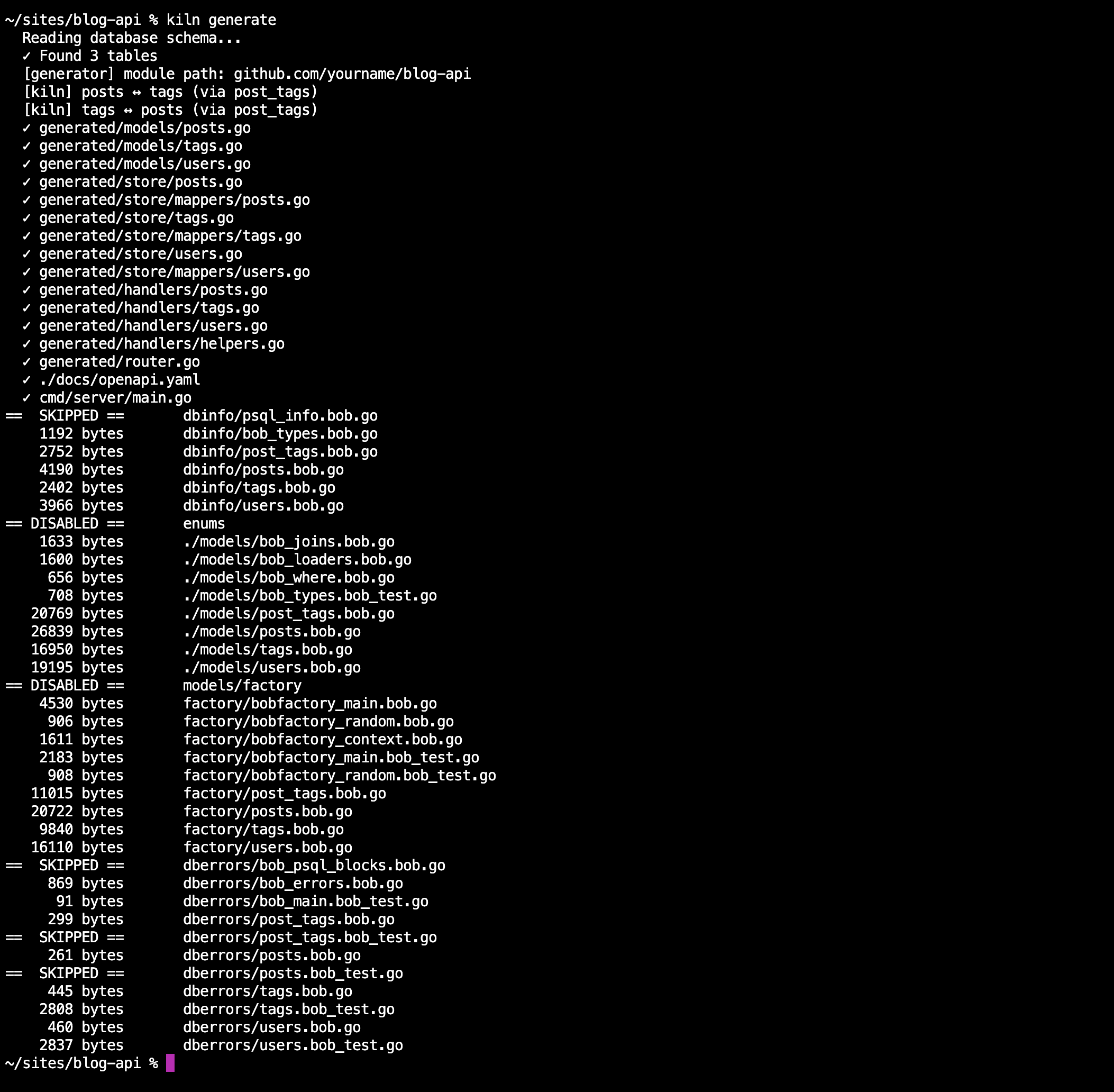
Step 6: Run the server
go mod tidy

# PostgreSQL
DATABASE_URL="postgres://demo:demo@localhost:5432/blogdb?sslmode=disable" go run cmd/server/main.go

# MySQL
DATABASE_URL="demo:demo@tcp(localhost:3306)/blogdb?parseTime=true" go run cmd/server/main.go

# SQLite
DATABASE_URL="./blogdb.sqlite" go run cmd/server/main.go
You'll notice go mod tidy pulls in bob - a type-safe query builder for Go. It's the only runtime dependency in the generated code. kiln uses bob under the hood to read your schema and generate type-safe database queries. You don't need to learn or interact with bob directly.
Your API is running. Let's test it.
Step 7: Try it out
Create a user:
curl -s -X POST http://localhost:8080/api/v1/users \
  -H "Content-Type: application/json" \
  -d '{"email": "[email protected]", "name": "Alice", "role": "admin"}' | jq
{
  "id": "a1b2c3d4-...",
  "email": "[email protected]",
  "name": "Alice",
  "role": "admin",
  "created_at": "2026-03-28T10:00:00Z",
  "updated_at": "2026-03-28T10:00:00Z"
}
Validation works out of the box:
curl -s -X POST http://localhost:8080/api/v1/users \
  -H "Content-Type: application/json" \
  -d '{"name": "Bob", "role": "superuser"}' | jq
{
  "error": "validation failed",
  "fields": {
    "email": "is required",
    "role": "must be one of: member moderator admin"
  }
}
kiln generated these validations from your schema. email is NOT NULL without a default, so it's required. role has a CHECK constraint, so only the allowed values pass.
Create a post:
curl -s -X POST http://localhost:8080/api/v1/posts \
  -H "Content-Type: application/json" \
  -d '{"user_id": "USER_ID_HERE", "title": "First Post", "body": "Hello world", "status": "published"}' | jq
List posts by user (nested route from the FK):
curl -s http://localhost:8080/api/v1/users/USER_ID_HERE/posts | jq
kiln saw that posts.user_id references users.id and generated this nested route automatically.
Filtering and sorting:
# Posts with status "published", sorted by newest first
curl -s "http://localhost:8080/api/v1/posts?status=published&sort=-created_at" | jq

# Users with role "admin"
curl -s "http://localhost:8080/api/v1/users?role=admin" | jq
Many-to-many - link a tag to a post:
# Create a tag
curl -s -X POST http://localhost:8080/api/v1/tags \
  -H "Content-Type: application/json" \
  -d '{"name": "go"}' | jq

# Link it to a post
curl -s -X POST http://localhost:8080/api/v1/posts/POST_ID_HERE/tags \
  -H "Content-Type: application/json" \
  -d '{"id": "TAG_ID_HERE"}' | jq

# List tags for a post
curl -s http://localhost:8080/api/v1/posts/POST_ID_HERE/tags | jq
kiln detected post_tags as a junction table and generated link, unlink, and list endpoints for both sides of the relationship.
Soft deletes:
curl -s -X DELETE http://localhost:8080/api/v1/posts/POST_ID_HERE | jq
This doesn't remove the row. Because posts has a nullable deleted_at column, kiln generated a soft delete - it sets deleted_at = now(). Subsequent GET and LIST calls exclude soft-deleted records automatically.
What the generated code looks like
kiln generates plain Go. No framework, no runtime dependency on kiln itself. Here's a generated handler:
// generated/handlers/users.go - Code generated by kiln. DO NOT EDIT.
package handlers

func (h *UserHandler) Create(w http.ResponseWriter, r *http.Request) {
    var req models.CreateUserRequest
    if !decodeJSON(w, r, &req) {
        return
    }
    if !validateRequest(w, req) {
        return
    }
    row, err := h.store.Create(r.Context(), req)
    if err != nil {
        handleStoreError(w, err, "users", "create")
        return
    }
    writeJSON(w, http.StatusCreated, row)
}
And a generated model:
// generated/models/users.go - Code generated by kiln. DO NOT EDIT.
package models

type CreateUserRequest struct {
    Email string  `json:"email" validate:"required,max=255"`
    Name  string  `json:"name"  validate:"required,max=100"`
    Bio   *string `json:"bio,omitempty"`
    Role  string  `json:"role"  validate:"omitempty,oneof=member moderator admin"`
}
The validation tags, nullable pointer types, and JSON tags are all derived from your database schema - regardless of whether you're using PostgreSQL, MySQL, or SQLite.
Evolving your schema
When your schema changes, regenerate:
ALTER TABLE users ADD COLUMN avatar_url TEXT;
kiln generate
kiln regenerates the models, store, handlers, and OpenAPI spec. Files you've customized (mappers, helpers, main.go) are protected by checksums - they won't be overwritten.
Customization
kiln generates the structural layer. Business logic is yours to add:
Disable operations per table in kiln.yaml:
overrides:
  users:
    disable: [delete]
    hidden_fields: [password_hash]
    readonly_fields: [email_verified_at]
Customize mappers to transform data between the database and API layer - add computed fields, redact sensitive data, reshape responses.
Customize helpers to change error formats, add logging, integrate with your observability stack.
Add your own endpoints alongside the generated ones. The generated router uses http.ServeMux (or chi, if configured), so you register additional routes the same way you normally would.
OpenAPI spec
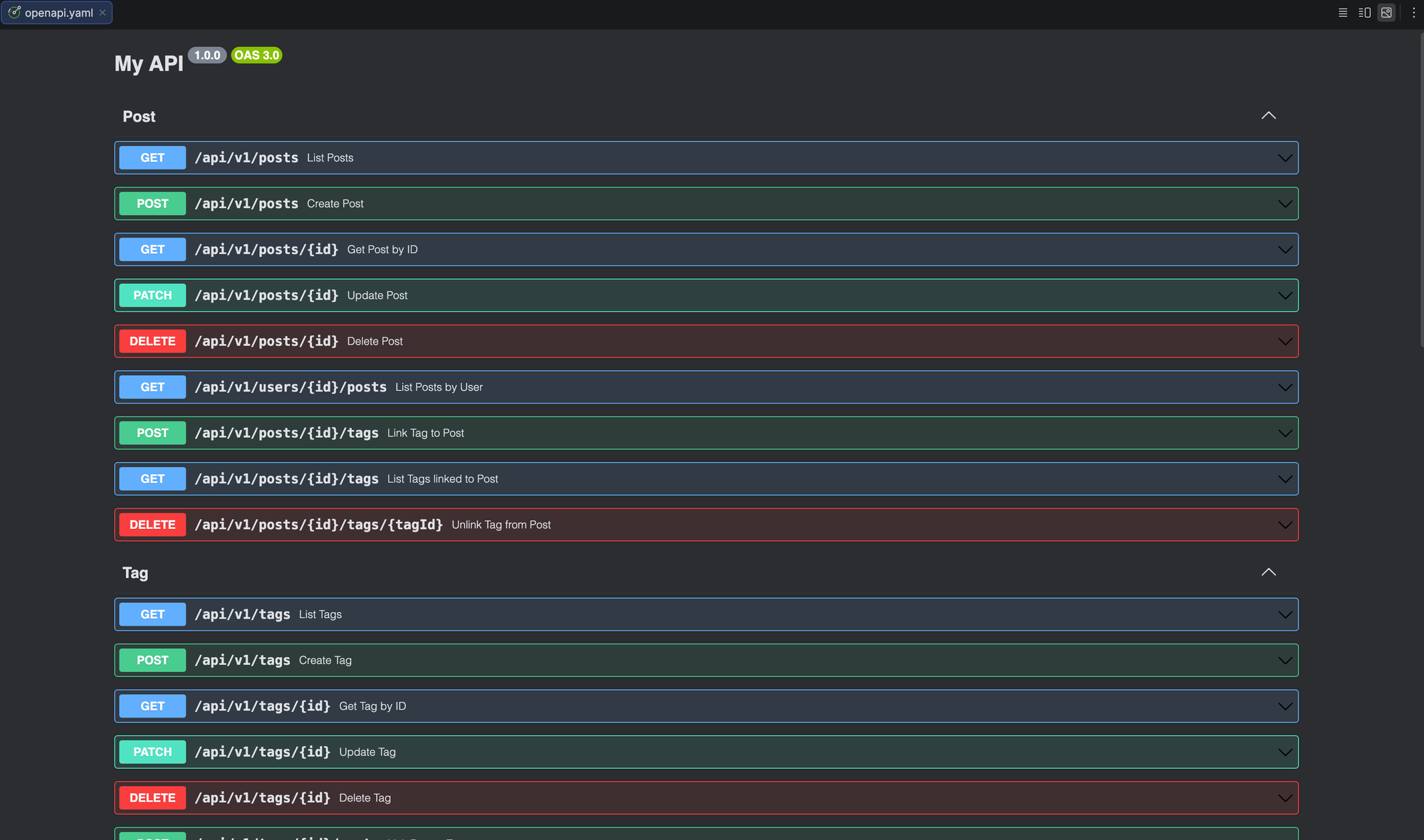
kiln generates an OpenAPI 3.0 spec at docs/openapi.yaml that stays in sync with your schema. Every regeneration updates it. Use it with Swagger UI, client generators, or API testing tools.
Next steps
- Browse the full documentation
- Browse kiln repository
- Try the demo blog API for a complete working example
- Read about filtering, sorting, and pagination options
- Set up JWT or API key authentication
Whether you're running PostgreSQL, MySQL, or SQLite - kiln generates the same production-ready Go code from your schema.